Category: Sap

  • Empowering Decision-Making with SAP Business One Alert Management

    Empowering Decision-Making with SAP Business One Alert Management

    In today’s fast-paced business environment, staying on top of critical activities and decisions is essential for success. However, manually monitoring every process across departments can be time-consuming and error-prone. This is where SAP Business One Alert Management comes into play, offering businesses a powerful tool to automate notifications and ensure timely actions.

    In this blog, we’ll explore how the Alert Management feature in SAP Business One works, its benefits, and how you can use it to proactively manage your business operations.

    What is SAP Business One Alert Management?

    Alert Management in SAP Business One is a feature that automatically monitors predefined conditions in your ERP system and triggers notifications when those conditions are met. These alerts can be sent via email, SMS, or displayed directly within the SAP Business One interface.

    This feature ensures that users are always informed of critical business events, such as overdue invoices, stock shortages, or price changes, without having to manually check for updates.

    Key Features of Alert Management

    1. Predefined and Custom Alerts

    SAP Business One comes with a variety of predefined alerts, but you can also create custom alerts to meet your specific needs. For example, you can set an alert to notify the sales team when a customer exceeds their credit limit.

    2. Real-Time Notifications

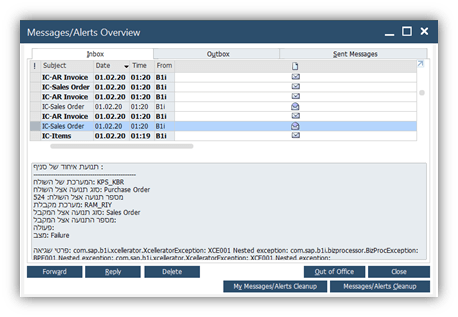
    Alerts are triggered in real-time, ensuring that key stakeholders can take action immediately when an issue arises.

    3. Flexible Delivery Options

    Choose how alerts are delivered: via email, SMS, or as a system notification. This flexibility ensures that critical updates reach the right people, no matter where they are.

    4. Wide Applicability

    Alerts can be configured for almost any module in SAP Business One, including sales, purchasing, inventory, and finance.

    5. Role-Based Notifications

    Assign alerts to specific users or roles to ensure the right people receive the information they need.

    Benefits of Alert Management

    1. Proactive Decision-Making

    By receiving timely notifications, users can make proactive decisions rather than reacting to problems after they occur.

    2. Improved Efficiency

    Automated alerts eliminate the need for manual monitoring, freeing up valuable time for employees to focus on more strategic tasks.

    3. Enhanced Customer Service

    Alerts for low stock or delayed deliveries enable businesses to respond quickly to customer needs, improving satisfaction and loyalty.

    4. Risk Mitigation

    By flagging potential issues like overdue payments or production delays, alerts help businesses minimize risks and avoid costly mistakes.

    5. Increased Accountability

    With role-based notifications, users are held accountable for their responsibilities, ensuring critical tasks are not overlooked.

    How to Set Up Alerts in SAP Business One

    Setting up alerts in SAP Business One is straightforward. Here’s a quick guide:

    On the Service tab of the General Settings window > Main Menu > Administration >System Initialization > General Settings, select the Enable Alert Service checkbox

    1.  Navigate to Alert Management

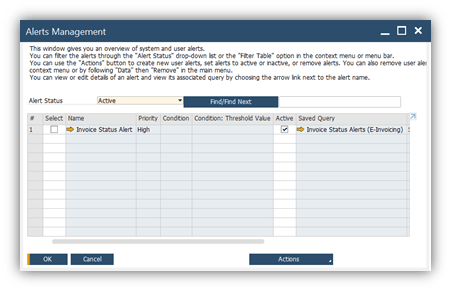
    Go to Administration > Alerts Management in the SAP Business One menu.
    2. Select a Template or Create a New Alert

    Choose from predefined alerts or create a new one based on your business needs.

    3. Define Alert Conditions

    Specify the conditions that will trigger the alert. For example, you might set an alert to notify you when inventory levels fall below a certain threshold.

    4. Assign Recipients

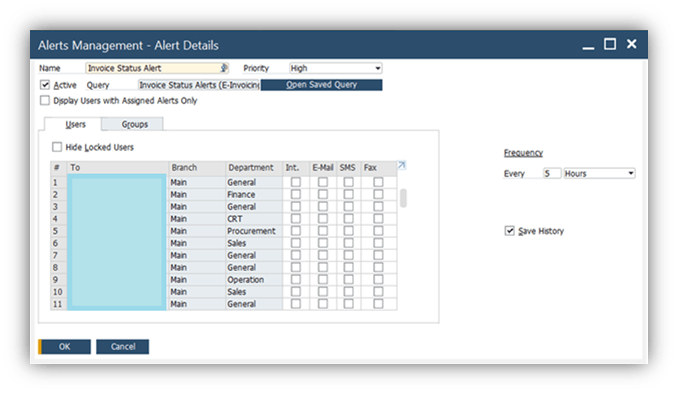
    Assign the alert to specific users or roles who need to take action.
    5. Test and Activate

    Test the alert to ensure it functions correctly, then activate it for real-time monitoring.

    Use Cases for Alert Management

    1. Sales and Customer Management

    • Notify sales representatives when a high-value customer places an order.
    • Alert account managers when a customer’s payment is overdue.

    2. Inventory and Supply Chain

    • Send alerts for low inventory levels to avoid stockouts.
    • Notify procurement teams of delayed supplier deliveries.

    3. Financial Monitoring

    • Trigger alerts when monthly expenses exceed budget limits.
    • Inform the finance team of unauthorized transactions.

    4.Production and Operations

    • Alert the production team about equipment maintenance schedules.
    • Notify managers of delays in production processes.
    Best Practices for Using Alert Management

    • Prioritize Key Alerts: Avoid overwhelming users with too many notifications by focusing on critical business events.
    • Customize Alerts: Tailor alerts to the unique needs of each department or user role.
    • Review and Update Regularly: Periodically review alerts to ensure they remain relevant and aligned with business goals.
    • Train Your Team: Educate users on how to respond to alerts effectively to maximize their value.

    Conclusion

    SAP Business One Alert Management is an indispensable tool for businesses looking to enhance operational efficiency and responsiveness. By automating notifications for critical events, businesses can stay proactive, reduce risks, and ensure that key processes run smoothly.

    Ready to unlock the full potential of SAP Business One? Take advantage of its Alert Management feature today and keep your business ahead of the curve.

    Would you like personalized guidance on setting up alerts for your business? Contact us now to get started!

  • What is SAP Business One used for?

    What is SAP Business One used for?

    Small and medium businesses (SMBs) are the cornerstone of the global economy, contributing more than half of all jobs worldwide. But with limited resources and budgets, SMBs need to prioritize investments that deliver tangible value. One investment that can help SMBs optimise their operations and grow their business is SAP Business One.

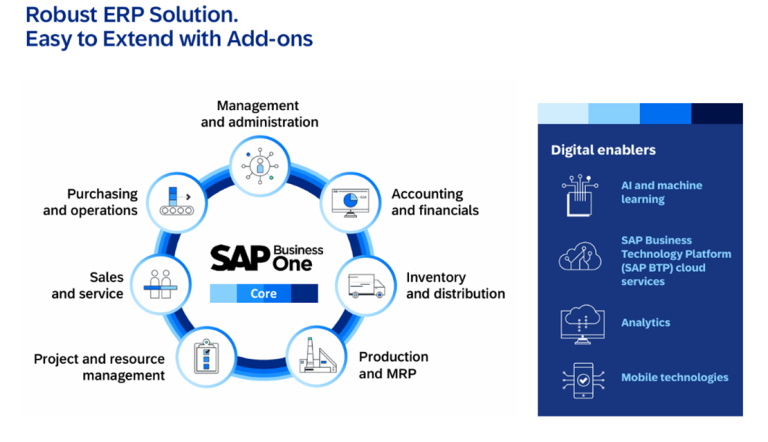
    SAP Business one is the affordable ERP solution that helps manage small businesses from accounting and financials, purchasing, inventory, sales and customer relationships to reporting and analytics. It offers a range of benefits that can help SMBs improve their efficiency, productivity, and profitability. In this post, we will look at the top benefits of SAP Business One.

    1. Streamlined Business Processes

    SAP Business One provides a unified platform for managing all aspects of a business, including finance, sales, purchasing, inventory, and production. This streamlines business processes and eliminates data silos, enabling SMBs to make more informed decisions and respond to changes in the market faster.

    2. Improved Data Accuracy

    With SAP Business One, SMBs can consolidate data from multiple sources and get a single, accurate view of their business operations. This reduces errors and improves data accuracy, enabling SMBs to make more informed decisions.

    3. Enhanced Customer Service

    SAP Business One includes customer relationship management (CRM) capabilities that enable SMBs to better understand their customers’ needs and preferences. This, in turn, allows SMBs to provide better customer service, which can improve customer loyalty and retention.

    4. Better Inventory Management

    SAP Business One offers advanced inventory management capabilities, including real-time tracking and reporting of inventory levels, automated reorder points, and lot and serial number management. This helps SMBs optimise their inventory levels, reduce waste and spoilage, and improve order fulfilment times.

    5. Accurate Financial Reporting & Financial management

    Improve margins, reduce errors, and drive more profitable decision-making with a complete set of tools for streamlined financial operations.

    SAP Business One provides robust financial management capabilities, including general ledger, accounts payable, accounts receivable, and cash flow management. This enables SMBs to generate accurate financial reports and gain insight into their financial performance.

      • Accounting

      Automate the handling of key accounting processes, such as journal entries, accounts receivable, and accounts payable.

      • Controlling

      Manage cash flow, track fixed assets, control budgets, and monitor project costs with greater accuracy and efficiency.

      • Fixed asset management

      Simplify the management of your fixed assets with a virtual function, eliminating the need for repetitive manual data entry.

      • Banking and reconciliation

      Process reconciliations, bank statements, and payments faster through various methods including checks, cash, and bank transfers.

      • Financial reporting and analysis

      Create standard or customized reports from real-time data to improve your business planning and audit review processes.

      6.Improved Production Planning

      SAP Business One includes production planning capabilities that help SMBs optimise their manufacturing processes. This includes automated production scheduling, material requirements planning, and bill of materials management, which can reduce costs and improve production efficiency.

      7. Increased Sales Effectiveness

      SAP Business One provides sales management capabilities that enable SMBs to better track and manage their sales activities. This includes lead and opportunity management, pipeline analysis, and sales forecasting, which can help SMBs close more deals and increase their revenue.

      • Sales and opportunity management

      Track all sales opportunities and lead activities throughout the sales cycle, from the first contact to deal closing.

      • Marketing campaign management

      Create, manage, and analyze marketing activities to turn prospects into customers and grow sales and profitability.

      • Customer management

      Store all critical customer data in one place by synchronizing and managing customer contacts stored in Microsoft Outlook.

      • Service management

      Craft and manage warranty contracts and service agreements efficiently, and enter and respond to service calls quickly.

      • Reporting and analysis

      Design detailed reports on all aspects of the sales process – from forecasting to pipeline tracking – by using templates.

      • Mobile sales

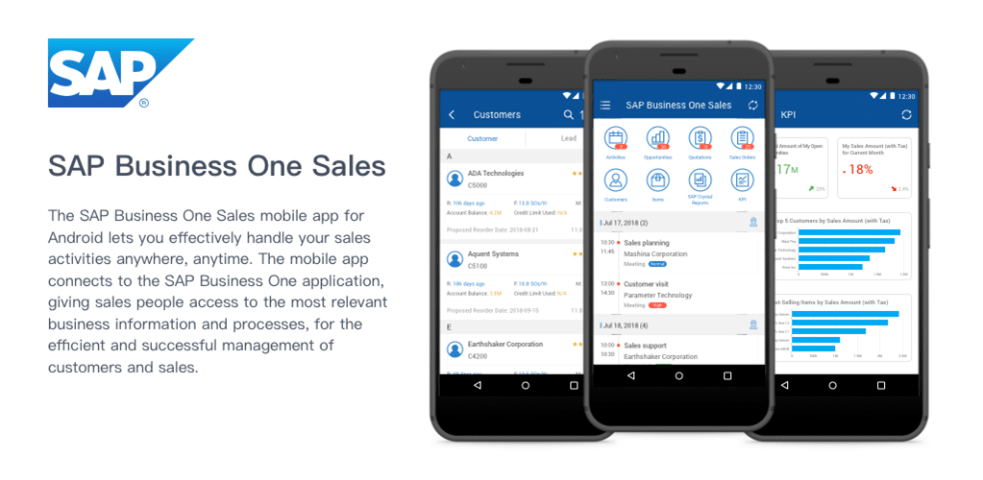
      Empower your entire sales organization to manage information on the move anytime, anywhere, and on any mobile device.

      8. Real-Time Business Insights

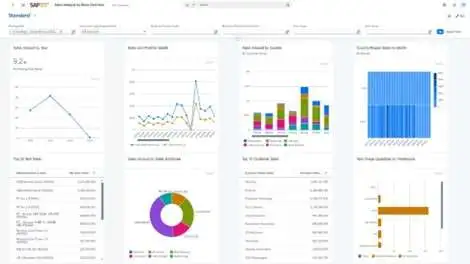
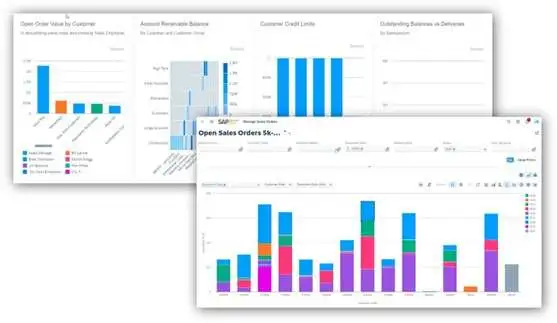
      SAP Business One includes business intelligence capabilities that enable SMBs to gain real-time insights into their operations. This includes customisable dashboards, ad-hoc reporting, and analytics, which can help SMBs make more informed decisions and respond to changes in the market faster.

      9. Greater Mobility

      SAP Business One includes mobile capabilities that enable SMBs to access critical business information from anywhere, at any time. This includes mobile apps for iOS and Android devices, which can help SMBs stay connected and productive on the go.

      10. Scalability

      SAP Business One is designed to grow with SMBs, offering flexible deployment options and a range of add-on modules to meet changing business needs. This enables SMBs to scale their operations without having to switch to a new system.

      SAP Business One offers a range of benefits that can help SMBs improve their efficiency, productivity, and profitability. From streamlined business processes to enhanced customer service, SAP Business One is a comprehensive business management solution that can help SMBs optimise their operations and grow their business.

      If you’re eager to discover how SAP Business One can optimize your business operations and boost profitability, Quintessential Technologies is here to assist! Our team will work with you to evaluate your unique business requirements and guide you through the implementation process. Reach out to us today to book a consultation with one of our experts and embark on the journey to scaling your business with SAP Business One.